Case Study

EquipOS

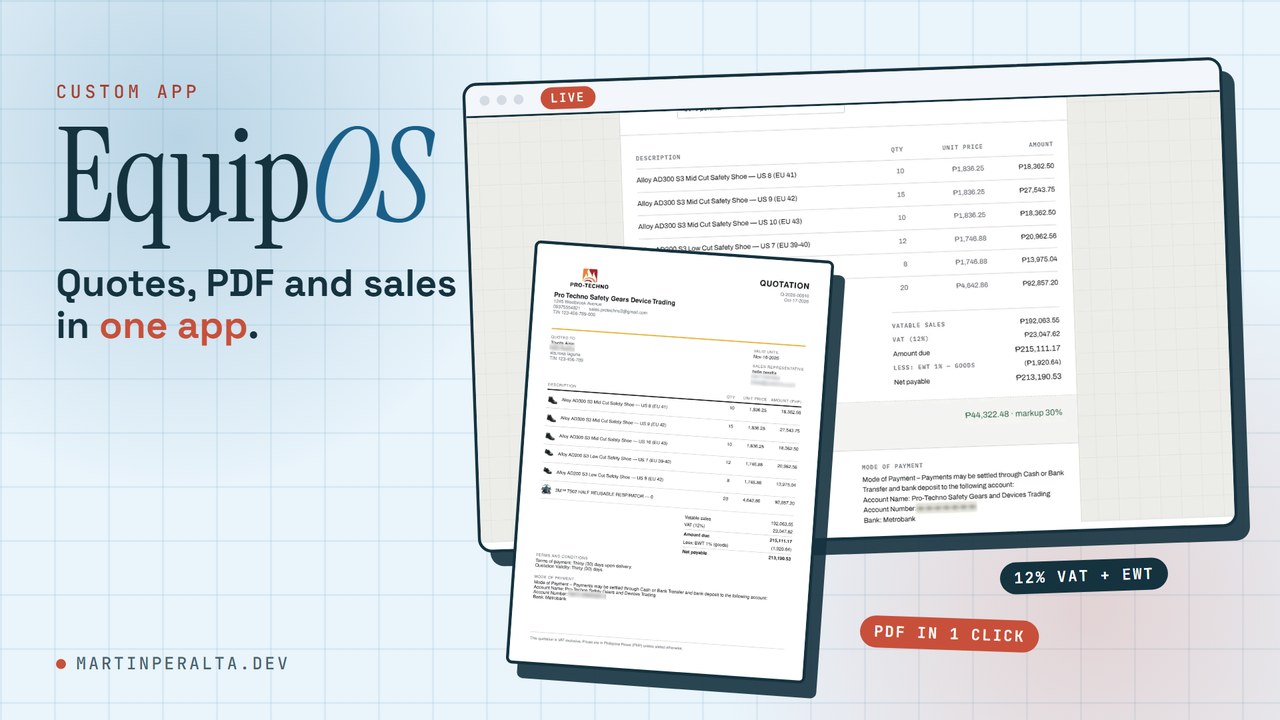
A quoting system built for a Philippine PPE supplier, live in the account of Pro Techno Safety Gears Device Trading. Products sit in the catalog with their sizes, certifications and supplier price. A quotation pulls lines from it for a customer, marks each one up on the supplier price, works out 12% VAT and BIR withholding, and keeps the profit internal. The PDF carries the letterhead, product photos and the sales rep’s contact; quotations then move from sent to accepted to paid, and reports show quoted against paid by month, year and sales rep. Since then it has gained a monthly Excel report, a monthly target for each rep, search by spec, and product photos that load 21 times lighter.

Recorded in Pro Techno’s live account. Customer contact names, phone numbers and emails, the sales reps’ and the team’s contact details, and the bank account number are blurred.

01Problem

Quotes were made by hand in Excel, and it took very long. Each one meant looking up supplier prices, adding the markup, working out 12% VAT and BIR withholding, and building the document, with no clear view of profit or of which quotes were accepted or paid.

02Solution

A catalog with sizes as separate SKUs and certifications, markup on the supplier price, VAT and BIR withholding worked out automatically, profit kept internal, a one-click PDF with letterhead and photos, sent to accepted to paid tracking, and reports by month, year and sales rep. Newer versions add a monthly Excel report, a target for each rep, and search by spec.

03Tools

Next.jsReactSupabase PostgresRow-level securityDrizzle ORMPDF generationExcel reports

04Outcome

25 → 4 minper quotation
~14 hrssaved each month
21×lighter product photos
Liveat Pro Techno

Time compared with building the quote in Excel, at about 40 quotations a month. The photo figure is measured: a 159 KB product photo becomes a 7 KB thumbnail, so a 50-product catalog page drops from about 8 MB to under 0.5 MB. One click takes a saved quote to the PDF.
How it works

  1. Products go into the catalog. Each one with its sizes as separate SKUs, its certifications, photos and lead time, and the supplier price, entered the way the supplier quotes it. Only the team sees what a product costs.
  2. A quotation is built for a customer. Pick the validity date, VAT inclusive or exclusive, withholding and the sales rep, then search the catalog, pick sizes and type quantities. Every line is marked up on the supplier price, and the estimated subtotal and profit update as you type.
  3. Saving locks it. The quotation takes the next number, the totals are worked out (12% VAT, then EWT at 1% on goods or 2% on services), and the profit stays internal.
  4. The PDF goes out. One click gives the customer a PDF with the letterhead and logo, product photos, the VAT breakdown, terms, payment details and the sales rep’s contact.
  5. It moves to paid. Sent, accepted and paid are one click each. Paid quotations count as sales in the reports, and any quotation can be duplicated for the next order.
12%VAT worked out
1% · 2%BIR withholding
1 clickto the PDF
Liveat Pro Techno

The catalog

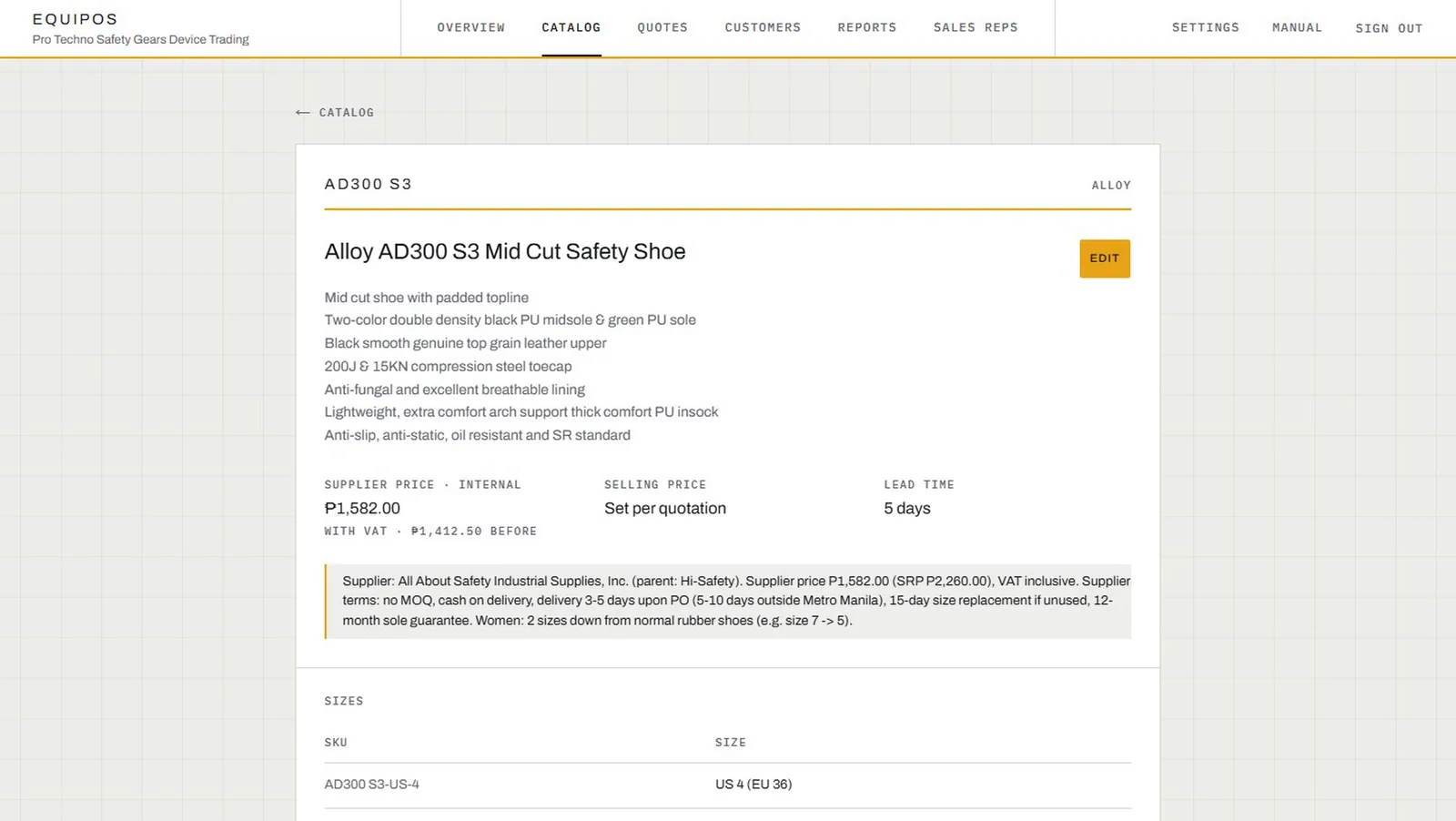
EquipOS product page for the Alloy AD300 S3 safety shoe: supplier price marked internal, selling price set per quotation, lead time and supplier notes
01A product, as the team sees it. The Alloy AD300 S3 safety shoe: its description, the supplier price marked internal (₱1,582.00 with VAT, ₱1,412.50 before), the selling price set per quotation, a 5-day lead time, and the supplier’s terms in a note. Further down, every size is its own SKU, with its certifications.
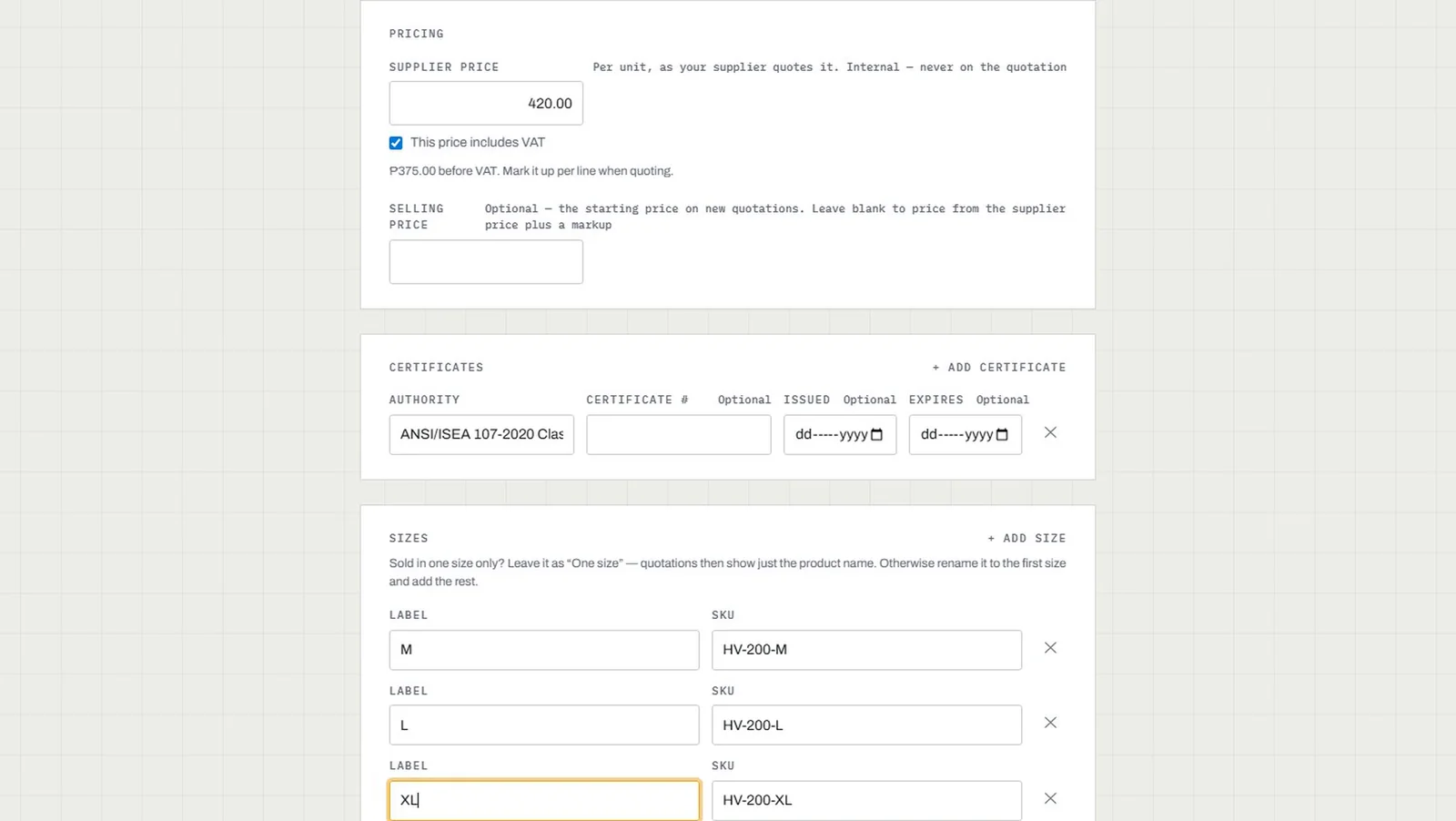
EquipOS Add product form: supplier price with VAT, a certification, and sizes M, L and XL with SKUs filled in automatically
02Adding a product. A hi-vis vest, HV-200: the supplier price typed as the supplier quotes it, with VAT, and the before-VAT cost worked out (₱375.00); a certification; and sizes M, L and XL whose SKUs fill themselves: HV-200-M, HV-200-L, HV-200-XL.
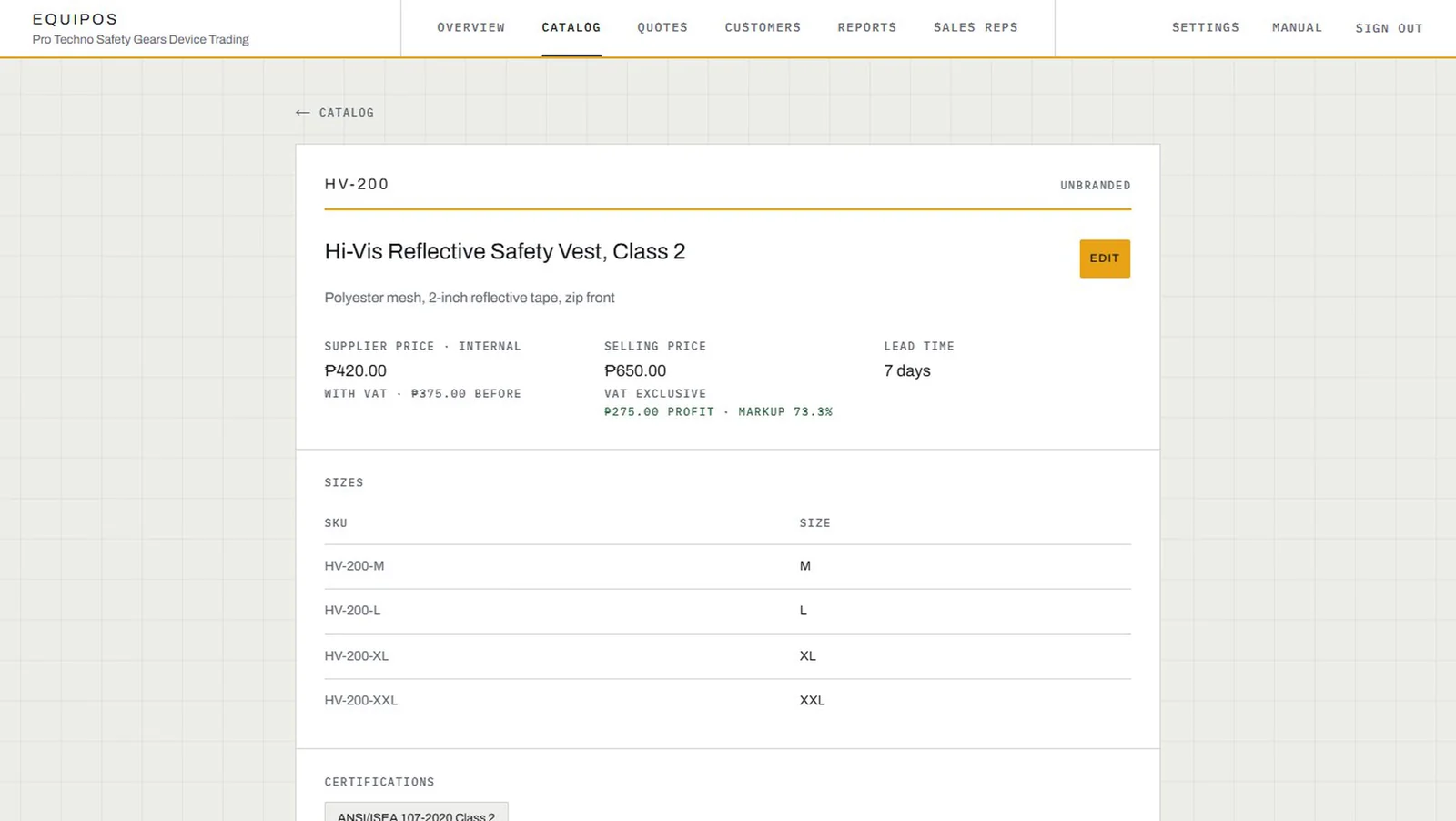
EquipOS product page for HV-200 after an edit: a ₱650 selling price showing ₱275 profit at a 73.3% markup, and four sizes
03Profit on the product page. An edit sets a ₱650.00 selling price and adds an XXL size. The page then shows ₱275.00 profit, a 73.3% markup on the ₱375.00 cost, for the team only.

Building a quotation

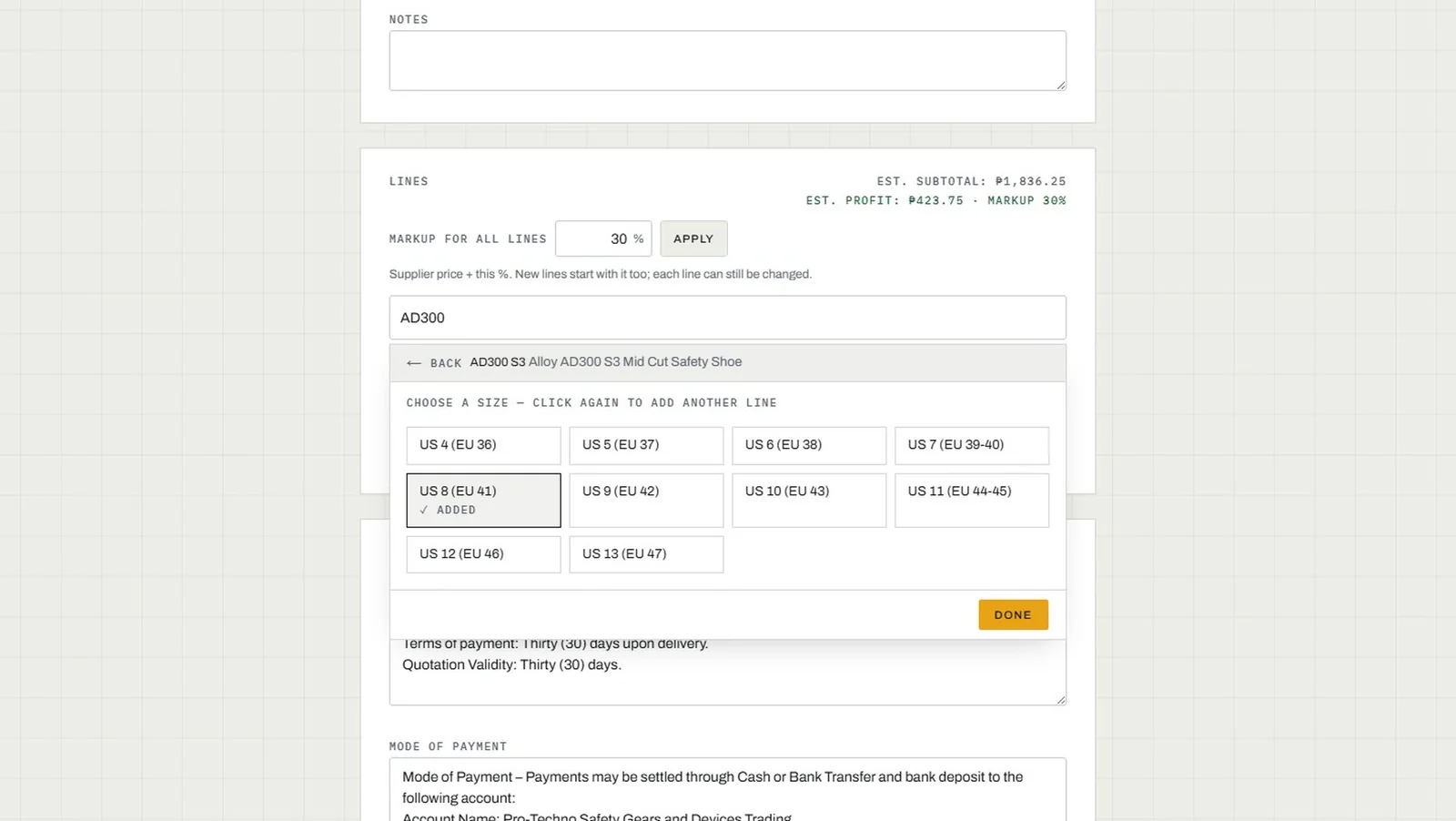
EquipOS quote builder size picker for the AD300 S3: sizes from US 4 to US 13, US 8 marked added
04Search, then pick the sizes. Typing “AD300” finds the shoe; each size clicked becomes its own line and is marked “Added”.
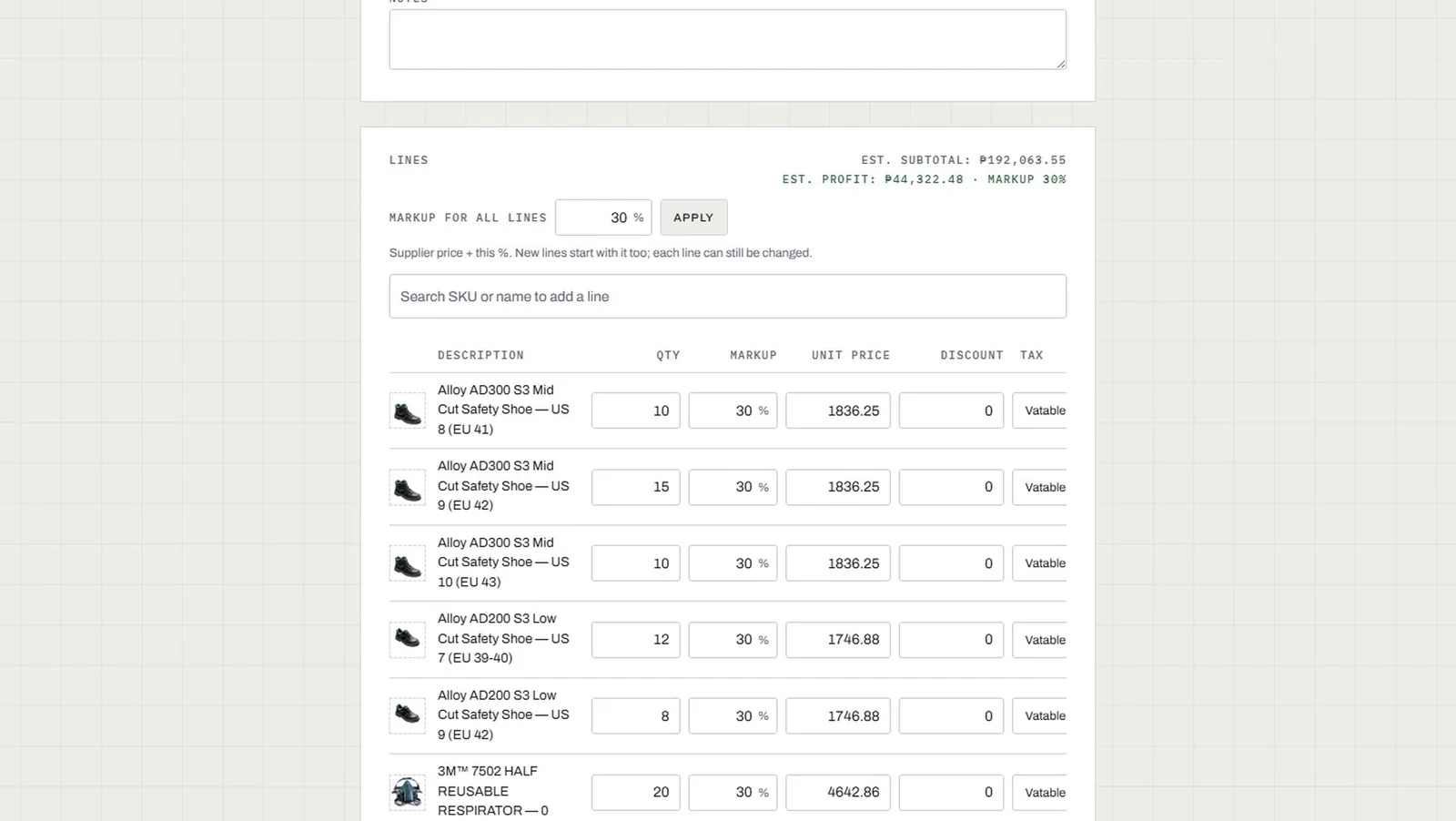
EquipOS quote builder with six lines at a 30% markup, an estimated subtotal of ₱192,063.55 and estimated profit of ₱44,322.48
05Six lines, priced as you go. Every line starts at the 30% markup set once above it, with quantity, unit price, discount and tax treatment on each line. The estimated subtotal (₱192,063.55) and profit (₱44,322.48) update as you type.

The quotation, the PDF and payment
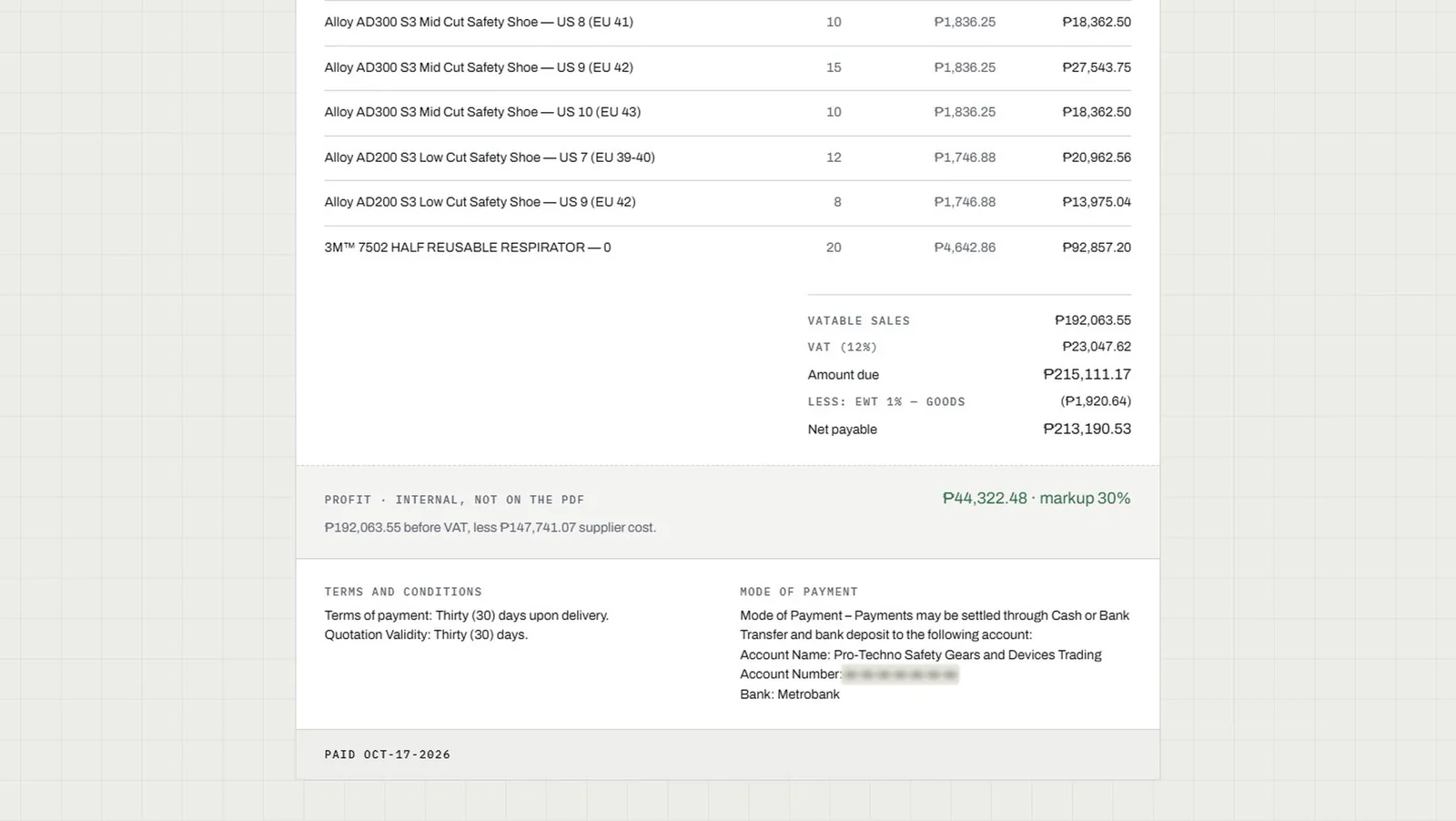
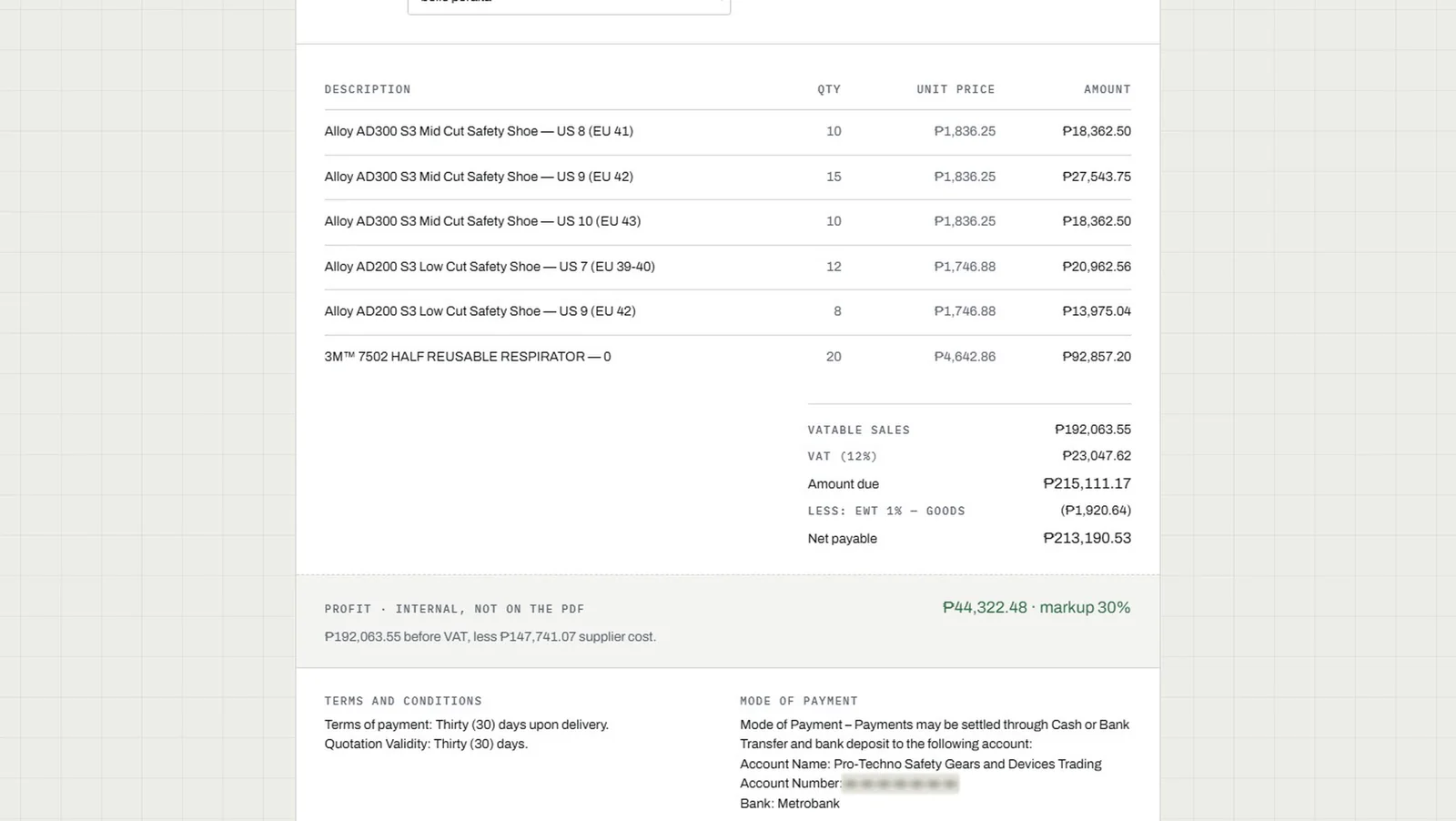
EquipOS saved quotation Q-2026-00010: vatable sales, 12% VAT, amount due, EWT 1% on goods, net payable, and an internal profit block
06The saved quotation. Q-2026-00010 for Toyota Aisin: vatable sales ₱192,063.55, 12% VAT ₱23,047.62, amount due ₱215,111.17, less EWT 1% on goods, net payable ₱213,190.53. The profit block below (₱44,322.48 at a 30% markup) is internal and never printed.
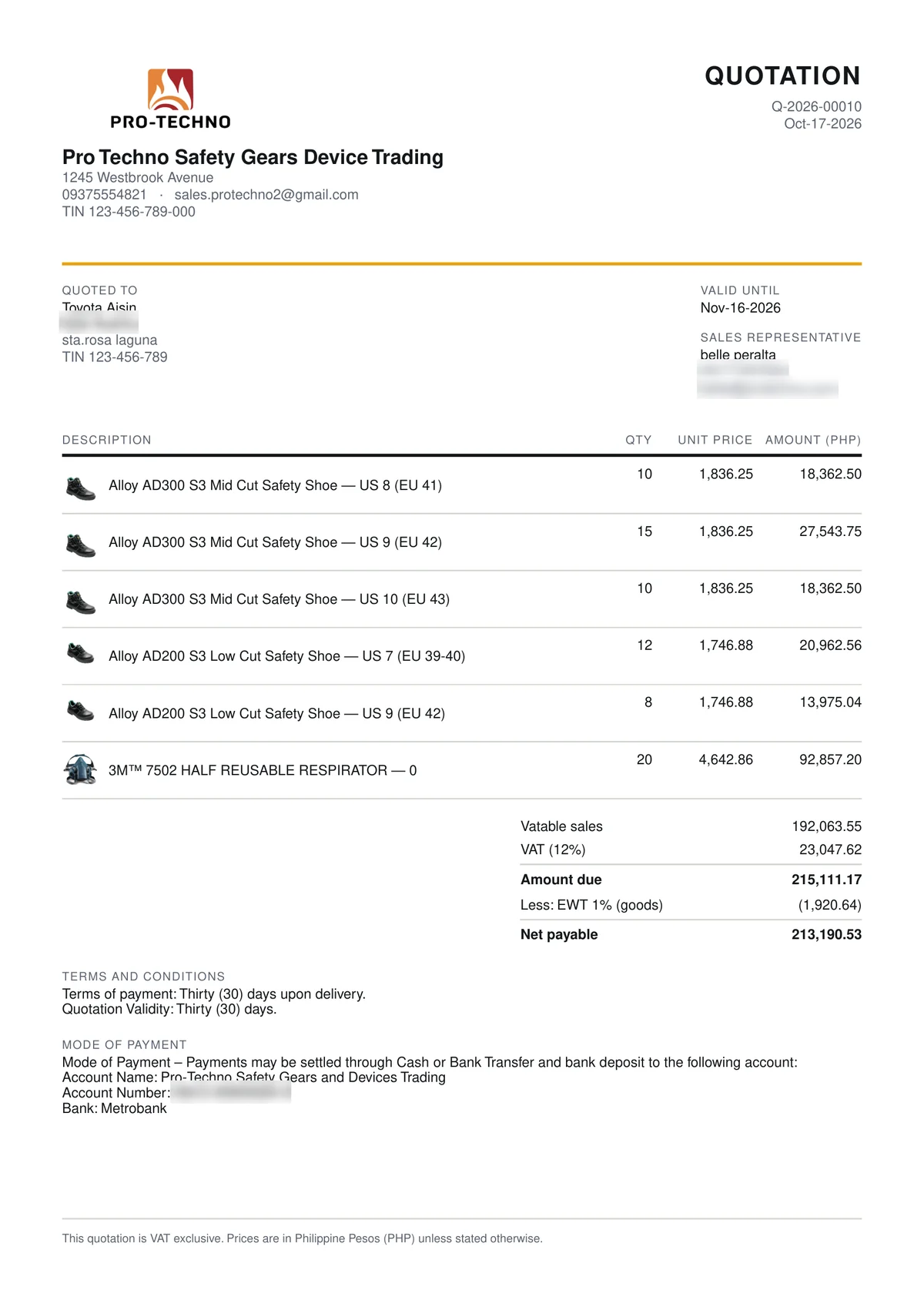
The quotation PDF for Q-2026-00010: Pro Techno letterhead and logo, product photos on each line, VAT and withholding totals, terms and payment details
07The PDF the customer receives. Pro Techno’s letterhead and logo, a product photo on every line, the VAT and withholding breakdown, terms, payment details and the sales rep. Here the customer’s contact person, the rep’s phone and email, and the bank account number are blurred.
EquipOS quotation marked paid on Oct-17-2026
08Sent, accepted, paid. Each step is one click. Mark as paid records the payment in full and cannot be undone, and the screen says so before it is pressed.
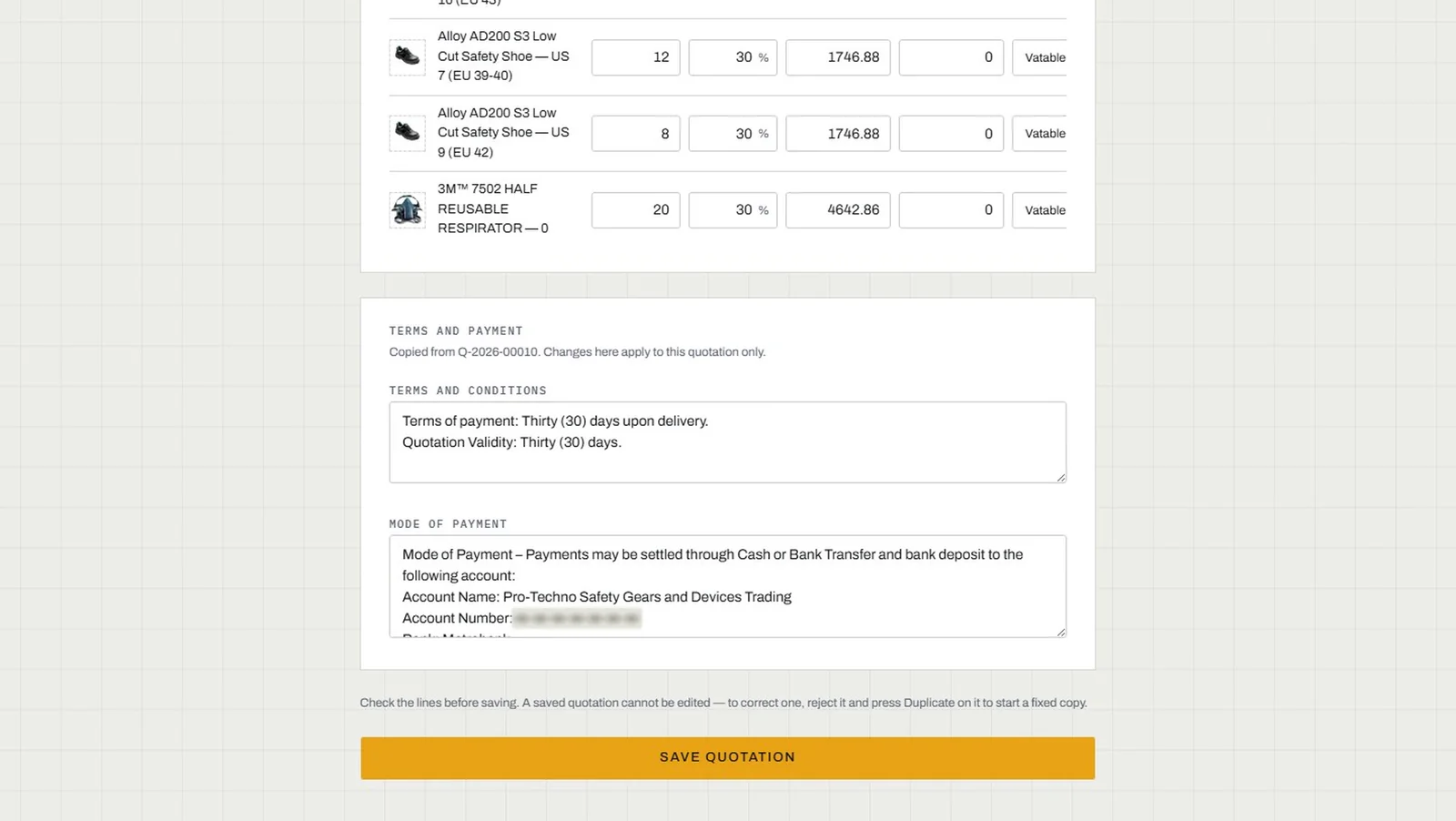
EquipOS quote builder opened from a duplicate, with lines and terms copied from Q-2026-00010
09Duplicate for the next order. The paid quotation opens in the builder with its lines, prices and terms, marked “Copied from Q-2026-00010”.

Customers, reps and reports

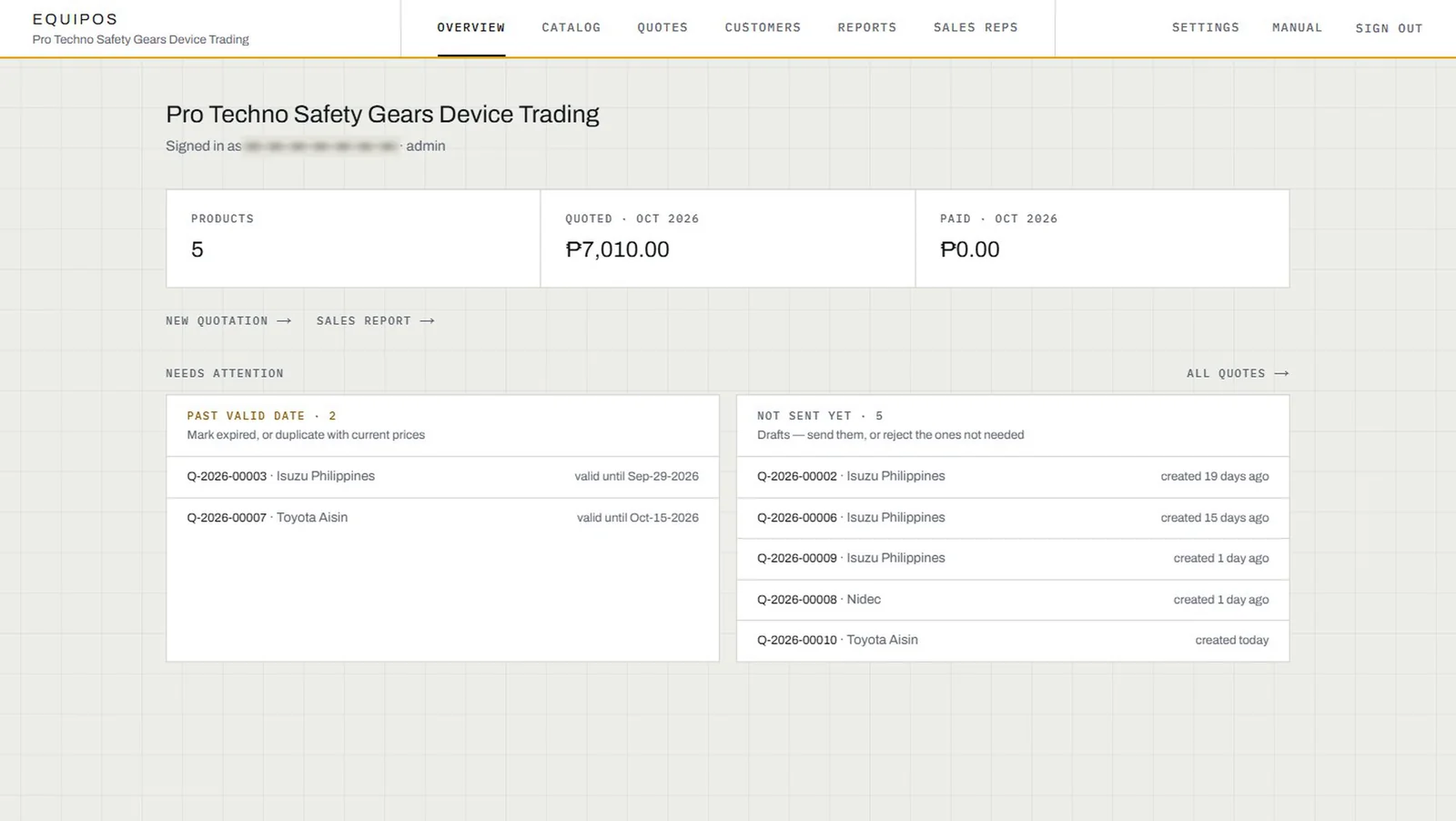
EquipOS Overview: products, quoted and paid this month, quotations past their valid date and drafts not sent yet
10The Overview. What needs attention first: quotations past their valid date and drafts not sent yet, beside this month’s quoted and paid totals.
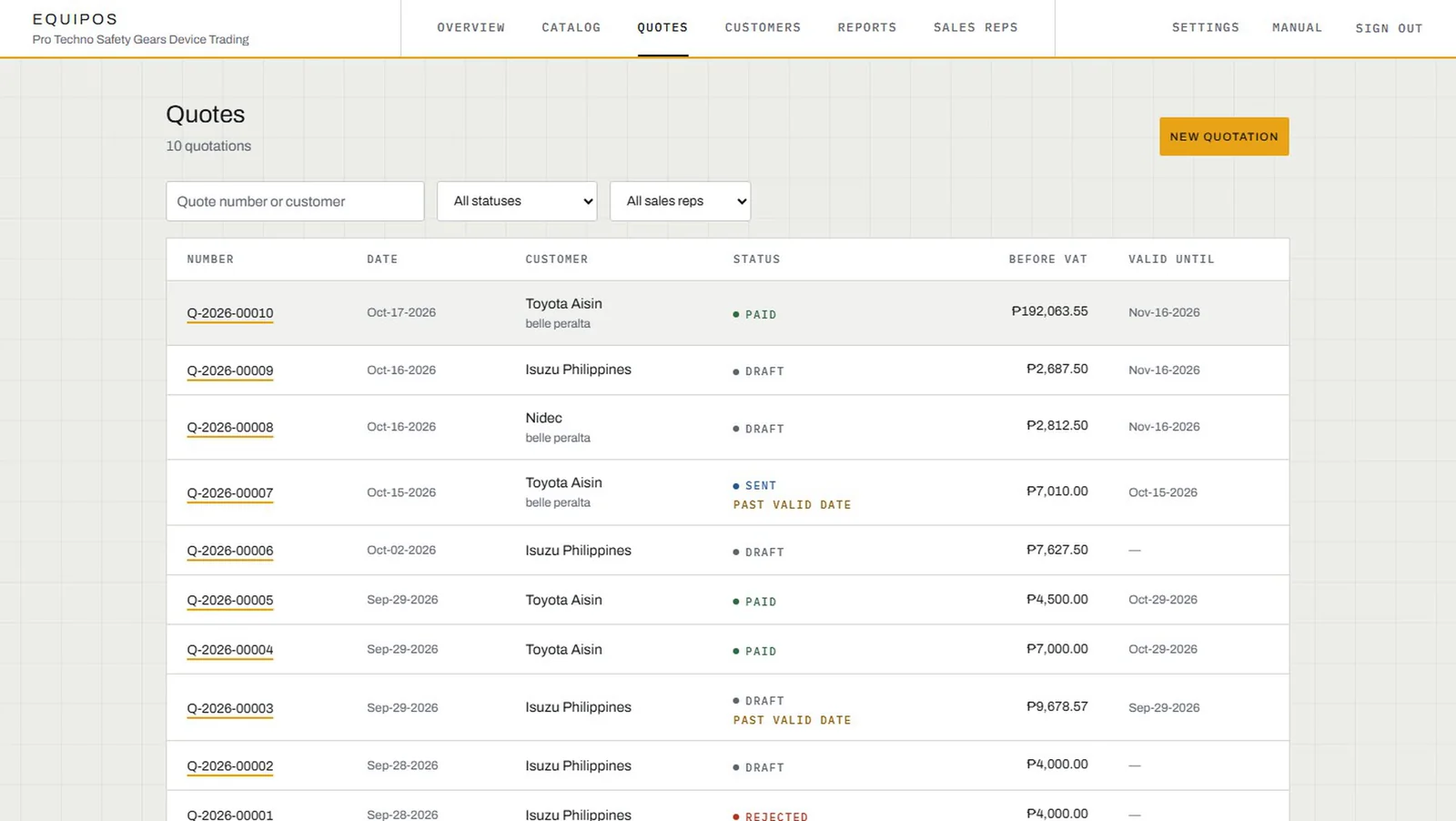
EquipOS Quotes list with colour-coded statuses, past-valid-date flags and filters
11Every quotation at a glance. Colour-coded statuses, a flag when one passes its valid date, and filters by status and sales rep.
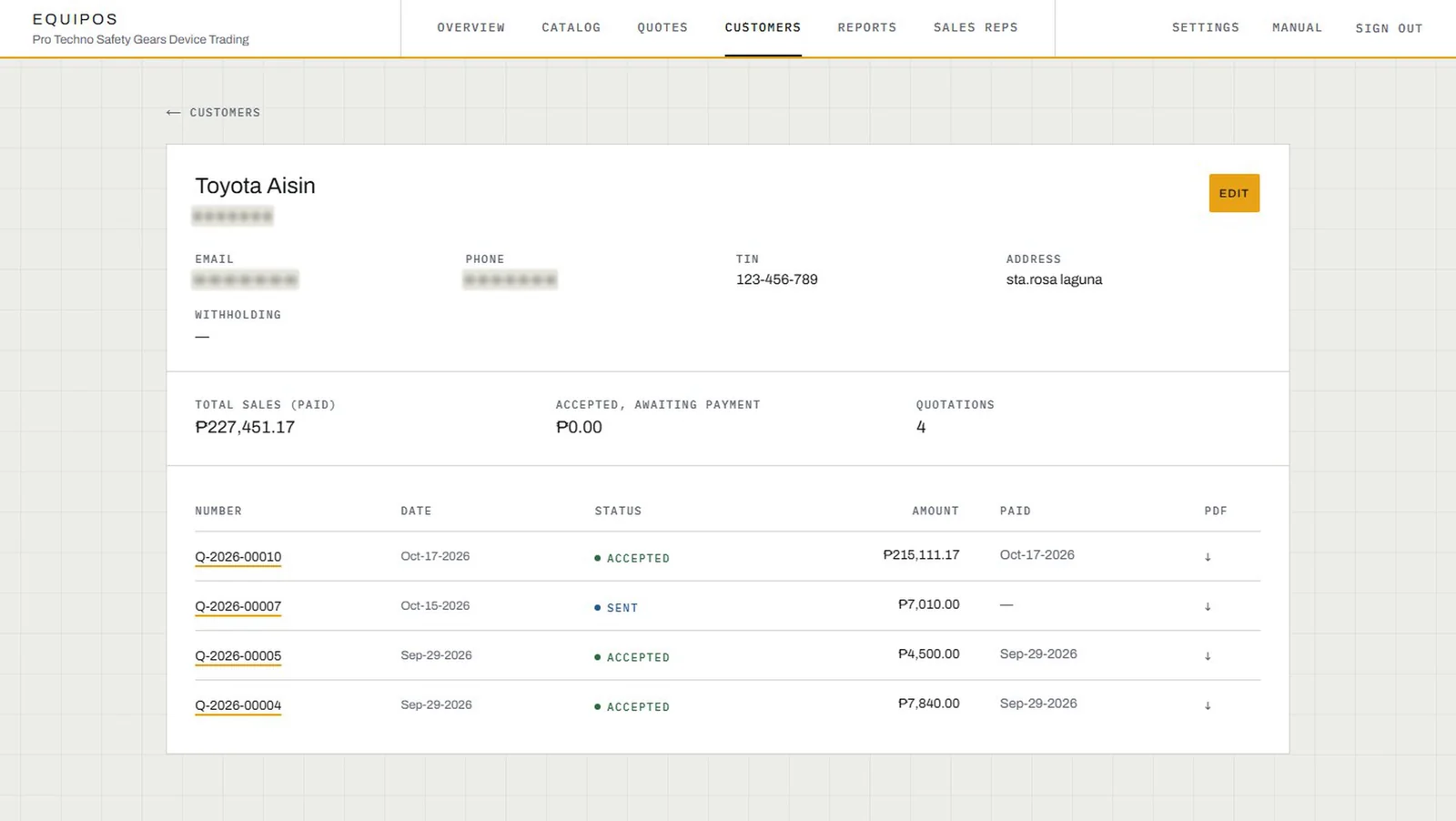
EquipOS customer history for Toyota Aisin: total paid, awaiting payment and every quotation with its PDF
12A customer’s history. Toyota Aisin: total paid, accepted but awaiting payment, and every quotation with its PDF. Contact details are blurred.
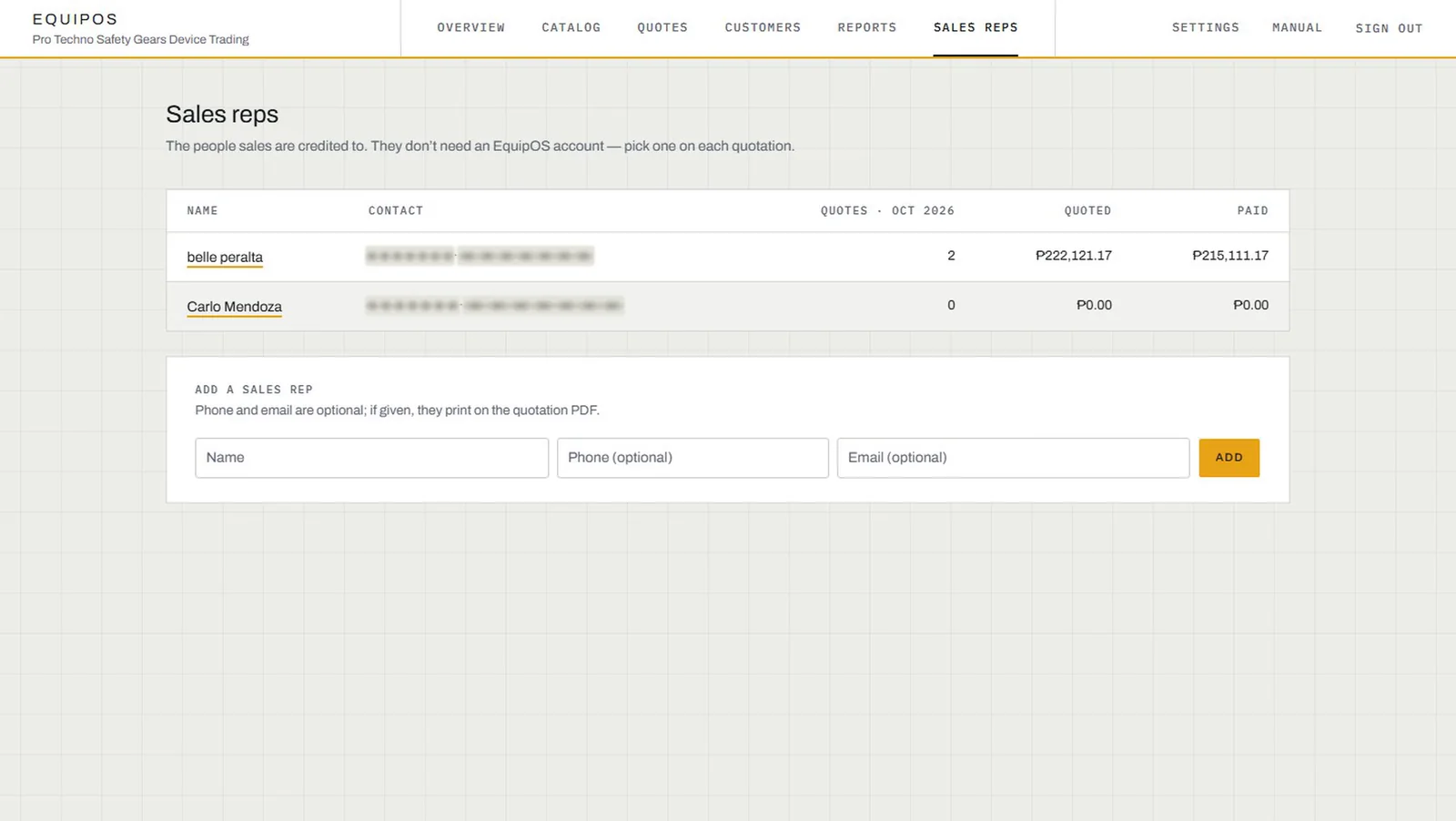
EquipOS Sales reps page with quotes, quoted and paid per rep this month
13Sales reps. Each quotation is credited to a rep, who needs no account; the page shows quotes, quoted and paid per rep this month. Phone numbers and emails are blurred.
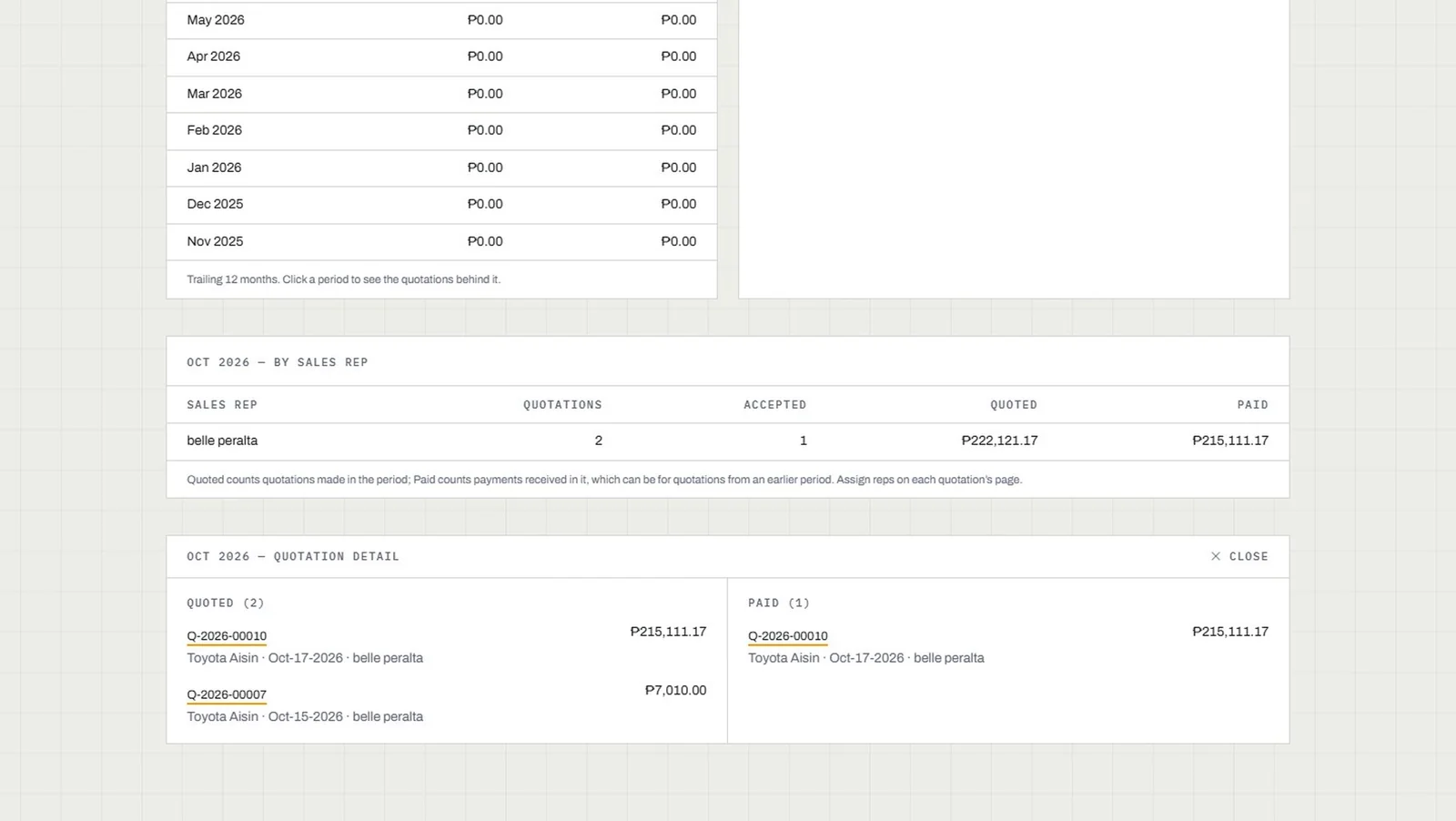
EquipOS Reports: sales by rep for October and the quotation detail behind the month
14Reports. Quoted against paid by month and by year, sales by rep, and a click on any month opens the quotations behind it.

Set up once

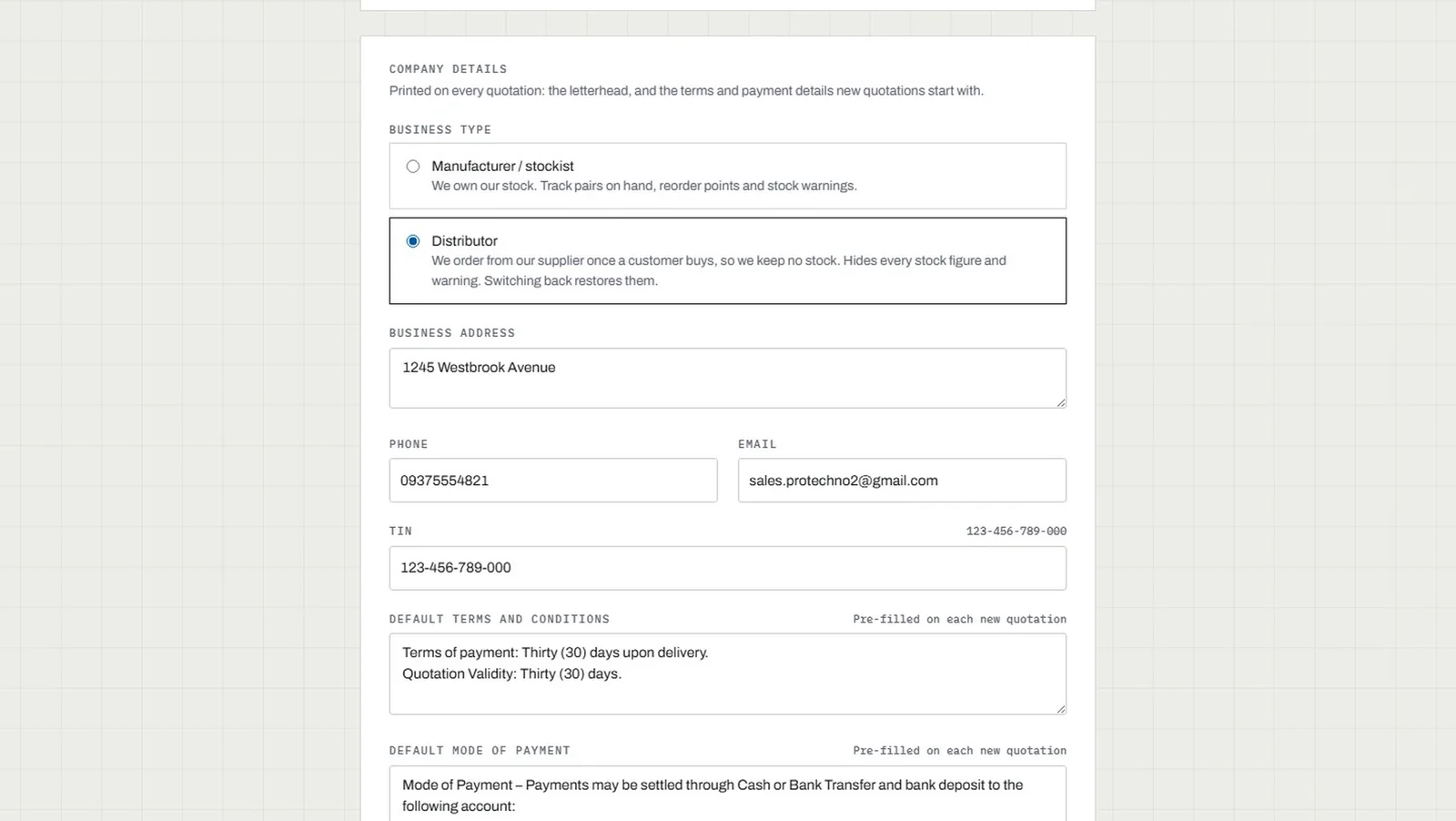
EquipOS Settings: business type set to Distributor, with address, phone, email, TIN and default terms
15Business type. A distributor orders from its supplier once a customer buys, so it keeps no stock: this setting hides every stock figure and warning. The logo, address, TIN and default terms are set here too.
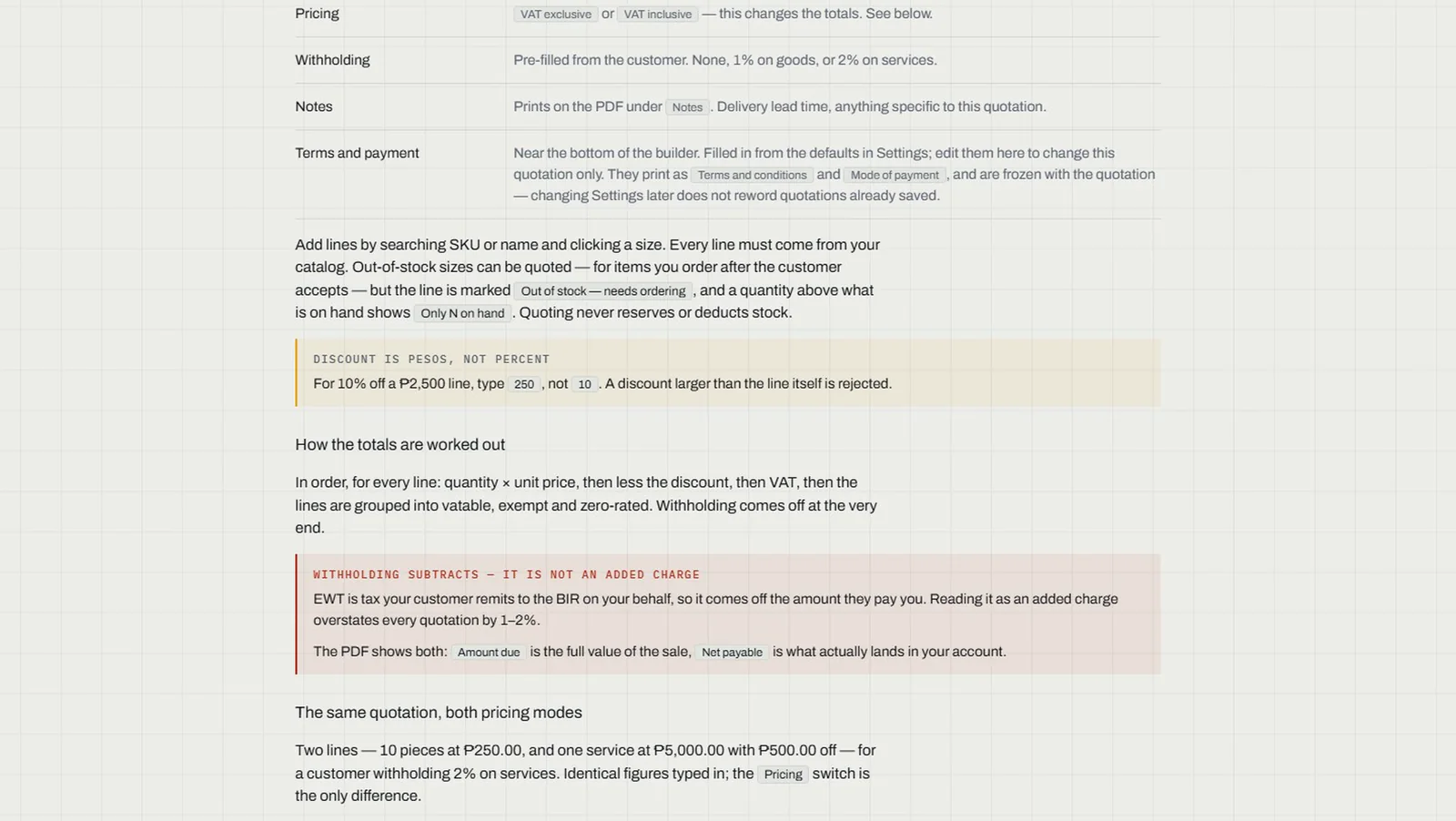
EquipOS built-in manual: the quotations section with red warnings
16A manual built in. Every screen explained, with red warnings at the actions that cannot be undone.

Added since

EquipOS now runs for more than one business, each on its own private database. These screens come from the product, with demo data.
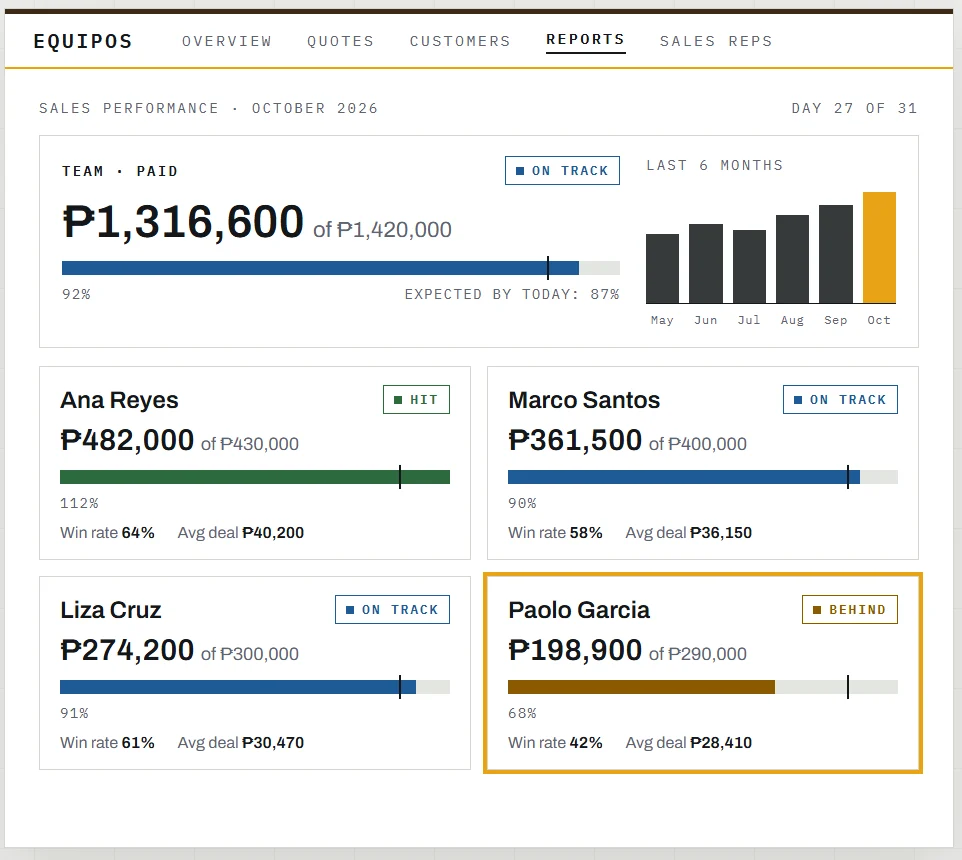
EquipOS Sales performance: a monthly target for each rep, with paid against target, win rate and average deal
17A target for every rep. Each rep gets a monthly target and the page shows what has been paid against it: hit, on track or behind, with win rate, average deal and the last six months.
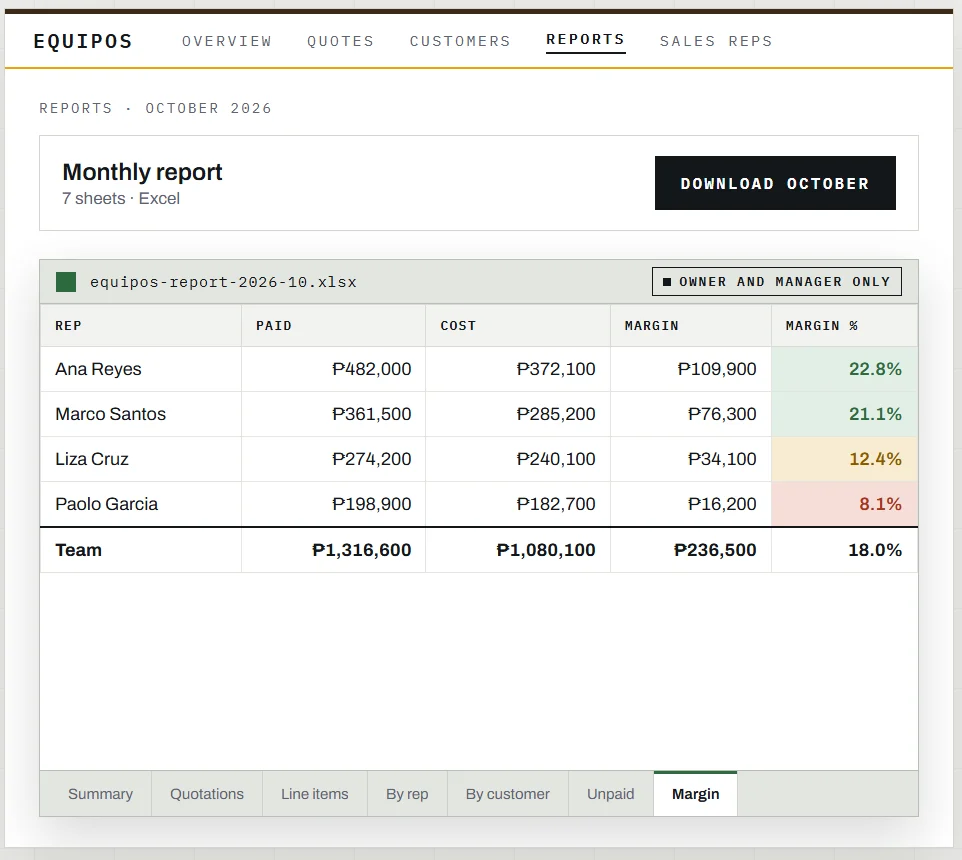
EquipOS monthly Excel report: the margin sheet by sales rep, colour-coded
18The month in one download. A seven-sheet Excel report for any month: quotations, line items, by rep, by customer, unpaid, and a margin sheet for owners and managers only, colour-coded.
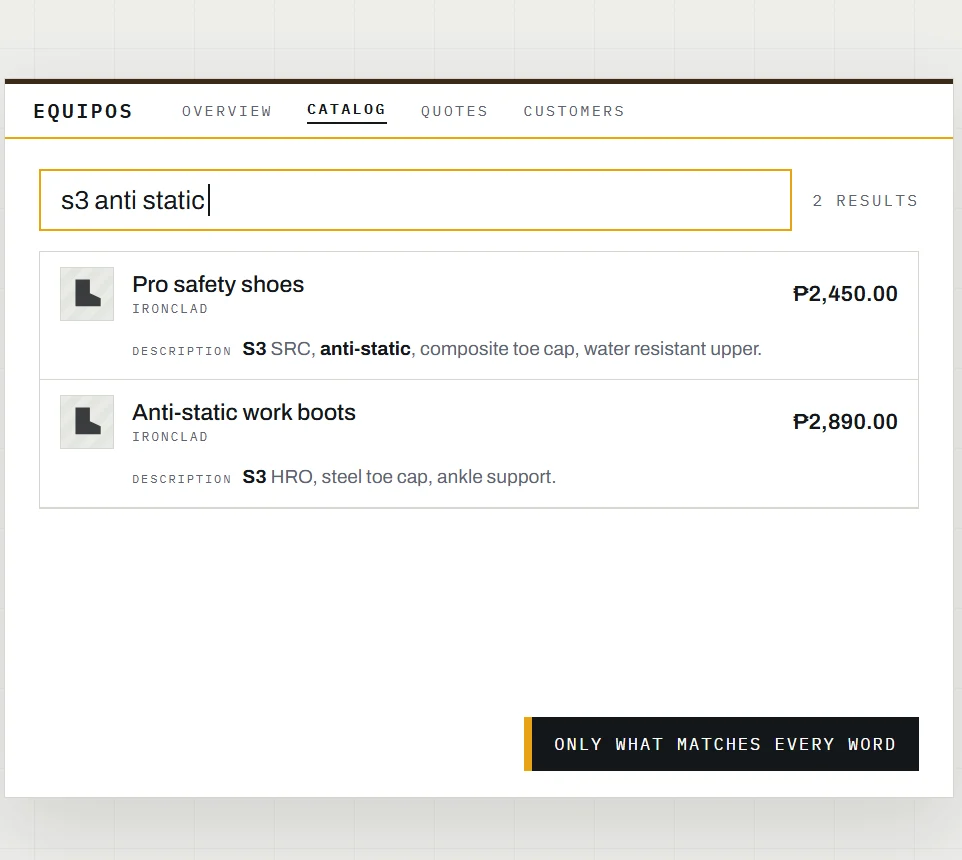
EquipOS catalog search for s3 anti static returning the two matching products
19Search by spec. Every word typed must match somewhere in the name, description, SKU, brand or certificate, so “s3 anti static” finds every S3 anti-static shoe.

How it is built

A Next.js and React app, served from Singapore. Each company’s data sits in Supabase Postgres behind row-level security, so each company sees only its own, and a test checks that every table is covered. Money is handled as exact decimals, never floating point. Sign-in is rate-limited, team members join by invitation, and the quotation PDF is generated on the server. Product photos are resized and compressed on the server when they are uploaded. Every client’s database is migrated by one command.